
When we launched Inter-1 on April 15, we said streaming inference was next. Today we release it.
The Streaming API brings the full Inter-1 capability set — 12 social signals, structured rationales, engagement tracking, and the five-dimension Conversation Quality Index — to live video, delivered as a typed event stream over WebSocket while the conversation is still happening.
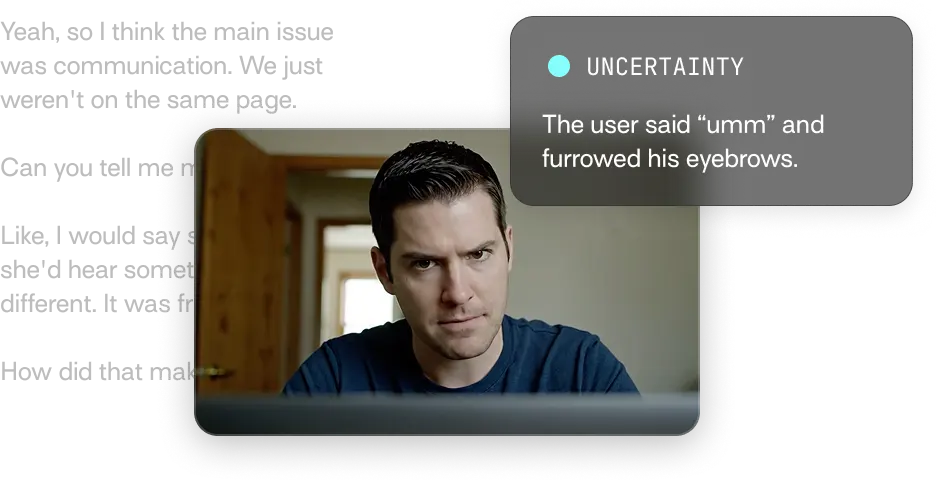
From static analysis to real-time processing
Inter-1 first shipped behind an upload endpoint. You sent a video file, the model processed it, and you got back a complete behavioral analysis: detected signals, rationales, and quality scores for the entire interaction. That's the right shape for retrospective work — reviewing a sales call after the fact, debriefing a coaching session, scoring interview recordings. Retrospective feedback is a powerful learning loop, and it's still the right mode for a lot of use cases.
But some feedback is only useful before the moment passes. A sales rep can respond to buyer hesitation while the call is still live. A candidate can adjust during interview practice, not after the recording ends. A clinician, coach, or trainer can change their approach as the interaction unfolds. For those workflows, looking backward is too late.
This shift toward real-time, multimodal interaction is happening across the field. Thinking Machines' recent work on interaction models argues that interactivity should scale alongside intelligence, with models perceiving and responding in continuous loops rather than discrete turns. We think they're right. The Streaming API is our first step there: opening up Inter-1's behavioral analysis to live conversation, where the output can actually shape what happens next.
How it works
The Streaming API is an event-driven WebSocket protocol. You open a connection, push video into it, and receive a typed stream of observations back. There are five moving parts worth understanding.

Handshake
The client connects, the server authenticates, and the first message back is a session.ready event declaring the rules of the road — maximum session length, maximum chunk size, supported config options. You build against those declared limits rather than assumed defaults.
Optional config
Before streaming begins, the client can send a session.configure message to opt in to additional analyses. By default you get signal detection and engagement with probability and a rationale.
Video in
The client pushes WebM video chunks one after another. There's no required segment size — the server piles incoming bytes into a rolling buffer and decides how to slice them for analysis.
Sliding-window analysis
By default the server runs 8-second analysis windows that slide every 3 seconds, so any moment in the conversation is looked at multiple times in slightly different contexts. Windows are processed concurrently to keep latency down, but results are emitted in order — you'll never see an observation about second 30 before one about second 25. Each window returns in less wall-clock time than the window itself covers (a sub-1.0 processing ratio). When the queue backs up — slow network, GPU contention, whatever — the server sheds redundant windows and tells the client which seconds it had to drop, so you never have silent gaps you don't know about.
Billing and shutdown
You're billed only for seconds of video that were actually analyzed and delivered. Dropped windows and failed work don't count. When the connection closes, in-flight analyses are cancelled, and any signals that were still active at disconnect are treated as implicitly ended — your client-side state can rely on every signal.detected having a corresponding signal.ended (explicit or implicit).
A note on positioning
The sub-1.0 processing ratio is fast enough to drive live coaching prompts, in-app overlays, and adaptive UI. It is not designed for sub-second conversational turn-taking.
If you're building a voice agent that needs to interrupt, backchannel, or speak simultaneously with the user, you want an interaction model. The Streaming API gives you the behavioral signal layer underneath whatever interactive system you build on top.
What it returns
Rather than one large payload per segment, the server emits typed events as state changes. Each event carries a session timestamp, so you can render an overlay, trigger a UI cue, or write the stream to a timeline for later review.
signal.detectedA social signal began (e.g. the listener started nodding in agreement, or the speaker began hedging). Includes the signal name, probability, and the structured rationale: which behavioral cues across which modalities (verbal, paraverbal, nonverbal) supported the detection.
signal.endedThat signal stopped. Pairs with the matching signal.detected.
engagement.updatedThe participant's engagement level changed (engaged, neutral, disengaged). Emitted only on transitions, not as a heartbeat.
conversation_quality.updatedPeriodic scorecard across five dimensions: clarity, authority, energy, rapport, and learning. Emitted roughly every 8 seconds, with both window scores and a cumulative session score that's time-weighted so a single strong moment doesn't drag the whole session.
errorSomething went wrong. Includes a code and a human-readable message.
{ "timestamp": "2026-05-18T13:28:33.680921Z", "correlation_id": "6d5b5776-265d-430d-8b4f-e37dde26fa93", "type": "signal.detected", "data": { "signal_type": "agreement", "start": 56, "probability": "high", "rationale": "The listener smiles warmly and nods his head while the speaker describes his actions as 'classic kid mischief.' His positive facial expression and nodding gestures clearly indicate his assent and alignment with the speaker's playful assessment." }}Quick start
Connect, wait for the handshake, configure, and stream. Below is a minimal end-to-end example in Python.
import asyncioimport jsonimport websockets INTERHUMAN_WS = "wss://api.interhuman.ai/v1/stream" async def stream_session(video_chunks, api_key): headers = {"Authorization": f"Bearer {api_key}"} async with websockets.connect(INTERHUMAN_WS, extra_headers=headers) as ws: # 1. Wait for session.ready – server declares limits and config options ready = json.loads(await ws.recv()) assert ready["type"] == "session.ready" # 2. Opt into additional analyses (signals + engagement are default) await ws.send(json.dumps({ "type": "session.configure", "include": ["conversation_quality", "feedback"], })) # 3. Stream video chunks and consume events concurrently async def sender(): for chunk in video_chunks: # raw WebM bytes, any size await ws.send(chunk) async def receiver(): async for message in ws: event = json.loads(message) handle(event) await asyncio.gather(sender(), receiver()) def handle(event): t = event.get("t") # session timestamp in seconds match event["type"]: case "signal.detected": print(f"[{t}s] {event['signal']} started " f"(p={event['probability']:.2f}) – {event['rationale']}") case "signal.ended": print(f"[{t}s] {event['signal']} ended") case "engagement.updated": print(f"[{t}s] engagement -> {event['state']}") case "conversation_quality.updated": print(f"[{t}s] CQI {event['scores']}") # clarity/authority/energy/rapport/learning case "feedback.generated": print(f"[{t}s] {event['text']}") case "error": print(f"[{t}s] ERROR {event['code']}: {event['message']}")Get started
Inter-1 streaming is available now via platform.interhuman.ai. Grab an API key, join the developer community on Discord, or read the docs to start building.